Runs on your laptop · nothing leaves your machine

A local-first application workspace that reduces every application from 30 minutes to 5.

Paste a job description and JA4M hands back an ATS-tailored copy of your own resume that preserves your layout exactly, generates recruiter outreach and application answers, and keeps every application organized with an automatic tracker, all running on your own laptop.

Free, bring your own Anthropic key· ~5¢ per application· no account, no cloud
Your data never leaves your laptop Never invents content Never sends on your behalf

A look inside

One workspace, from paste to sent.
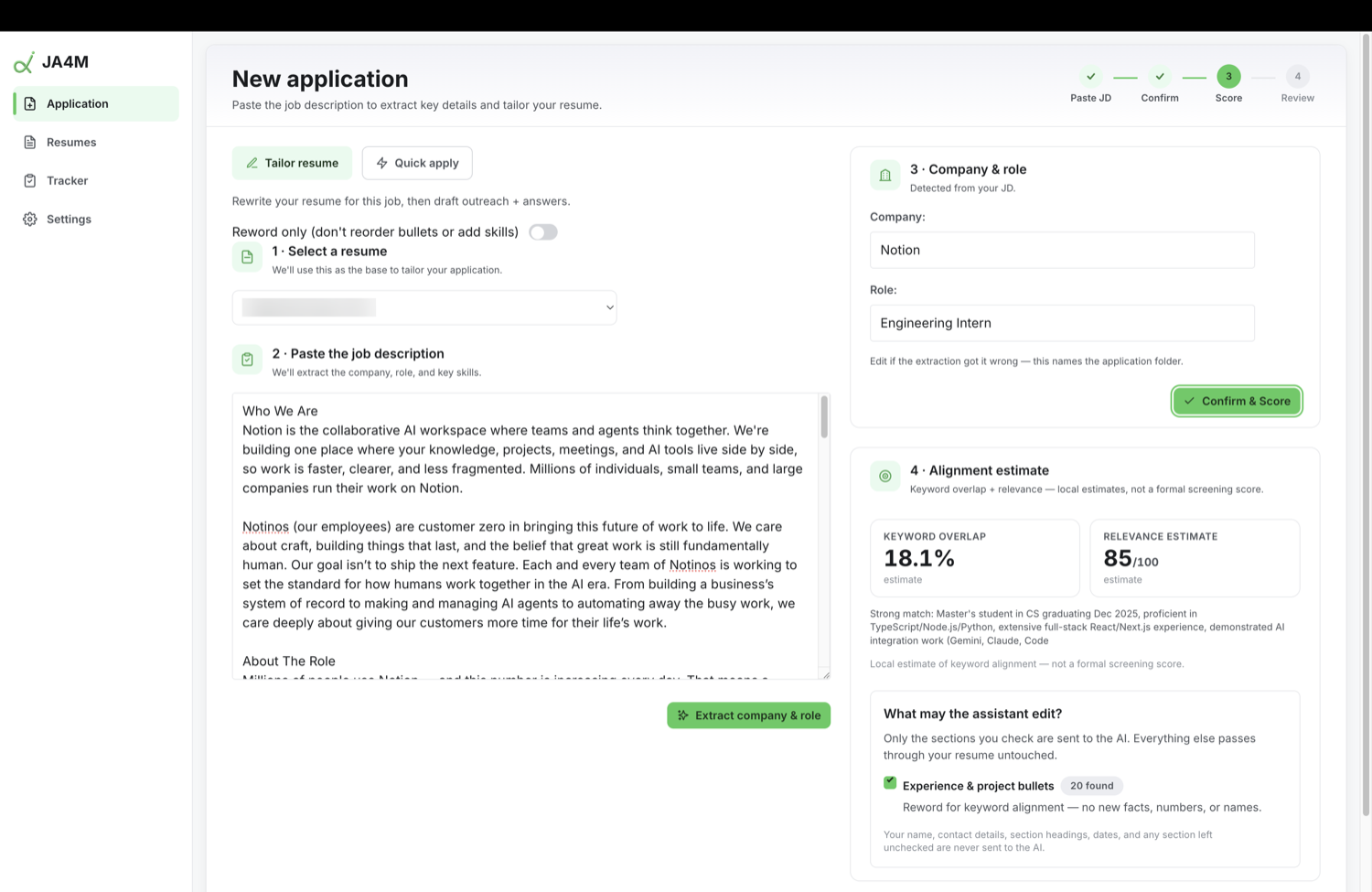
Paste the job, score the fit, and choose what the assistant may touch.

The problem

A thoughtful application is the same work, over and over.

Every role wants a slightly different resume, a bit of outreach, a few application answers, and one more row in a spreadsheet you keep forgetting to update. JA4M does the repetitive parts and keeps you in control of every submission.

20–30 min per applicationabout 5 minutes
Tailor the resume, rewrite only the bullets, keep your exact layout.
Write the outreach, a cold email and a LinkedIn DM, ready to copy.
Answer the questions, from your real resume, never invented.
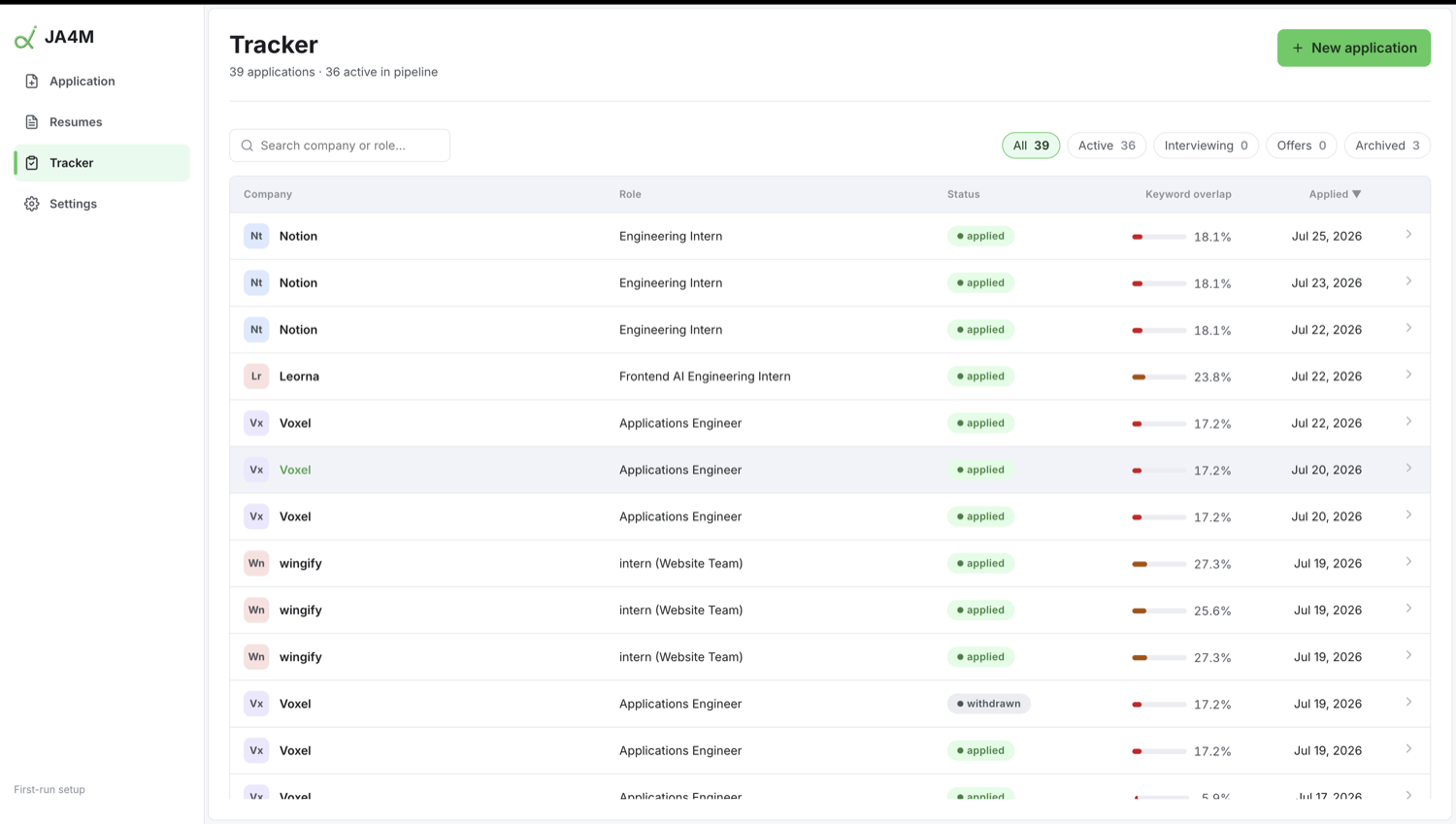
Track everything, a dashboard that keeps itself up to date.

How it works

Paste a job. Review every change. Send what’s yours.

Three steps, and you stay the editor the whole way. Nothing is saved or sent until you approve it.

01

Paste the job description

JA4M extracts the company and role, scores your keyword overlap against the posting, and shows exactly which parts of your resume it may touch. You pick the base resume; it never guesses.

02

Review every change, side by side

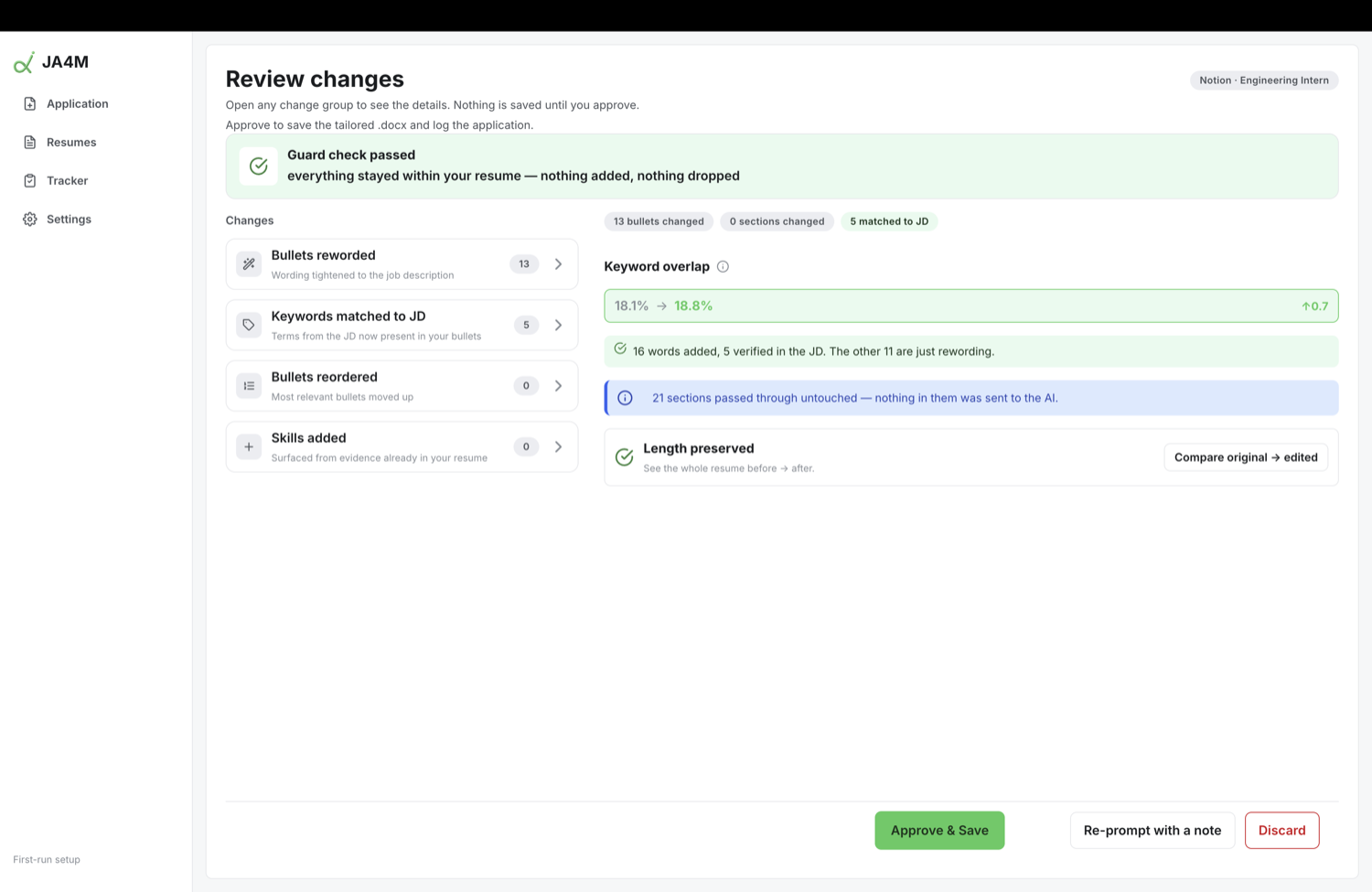
A constrained edit pass rewrites bullet wording to match the job. A guard check verifies that nothing was added, dropped, or invented, and that your one-page layout is preserved, before you approve.

03

Get your tailored .docx, plus outreach

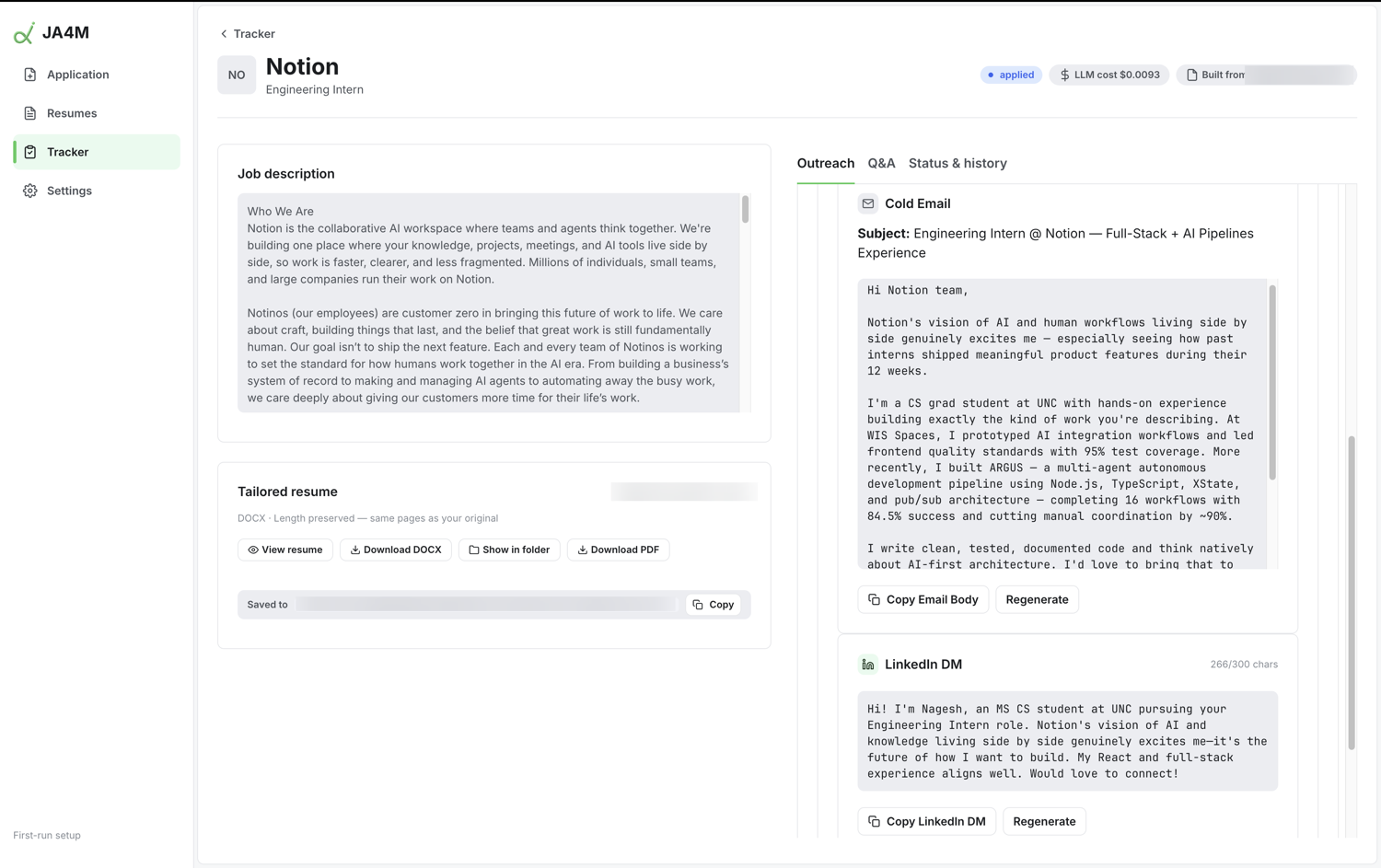
Approve, and JA4M writes the edited .docx alongside a cold email, a LinkedIn DM, and answers to the application questions. You copy and send them yourself. The tracker logs it automatically.

Why you can trust it

It’s still your resume. That’s the whole point.

Most “AI resume” tools upload your resume to their servers and hand back an AI-written document. JA4M does the opposite: it runs on your machine and edits the file you already trust.

Guard check passed
everything stayed within your resume, nothing added, nothing dropped
Never invents contentEvery edit is hashed and re-verified before it is written. New numbers, names, or facts are rejected. If an edit can’t be applied cleanly, your original file is delivered untouched.
Never sends anything for youNo auto-apply, no emails fired on your behalf. JA4M writes the outreach; you read it and send it yourself.
Your data stays localYour resume, your email, and your application history live in a folder on your laptop. No account, no cloud database, no telemetry.
Your layout, preservedIt edits your .docx in place instead of re-rendering it, so fonts, spacing, and your one page survive exactly as designed.

One workspace

Everything a single application needs.

Tailor

Resume tailoring

Constrained edits with a keyword-overlap score and a relevance estimate, inside your own file.

Quick apply

Send your resume as-is

Already a fit? Skip tailoring and send your original resume verbatim, with outreach alongside.

Outreach

Cold email & DM

A short cold email and a LinkedIn DM you review and send by hand. The app never sends them.

Answers

Application Q&A

Answers to screening questions drawn only from your real resume and the job description.

Tracker

Application tracker

A sortable dashboard of every application, with status history and per-application cost.

Automatic

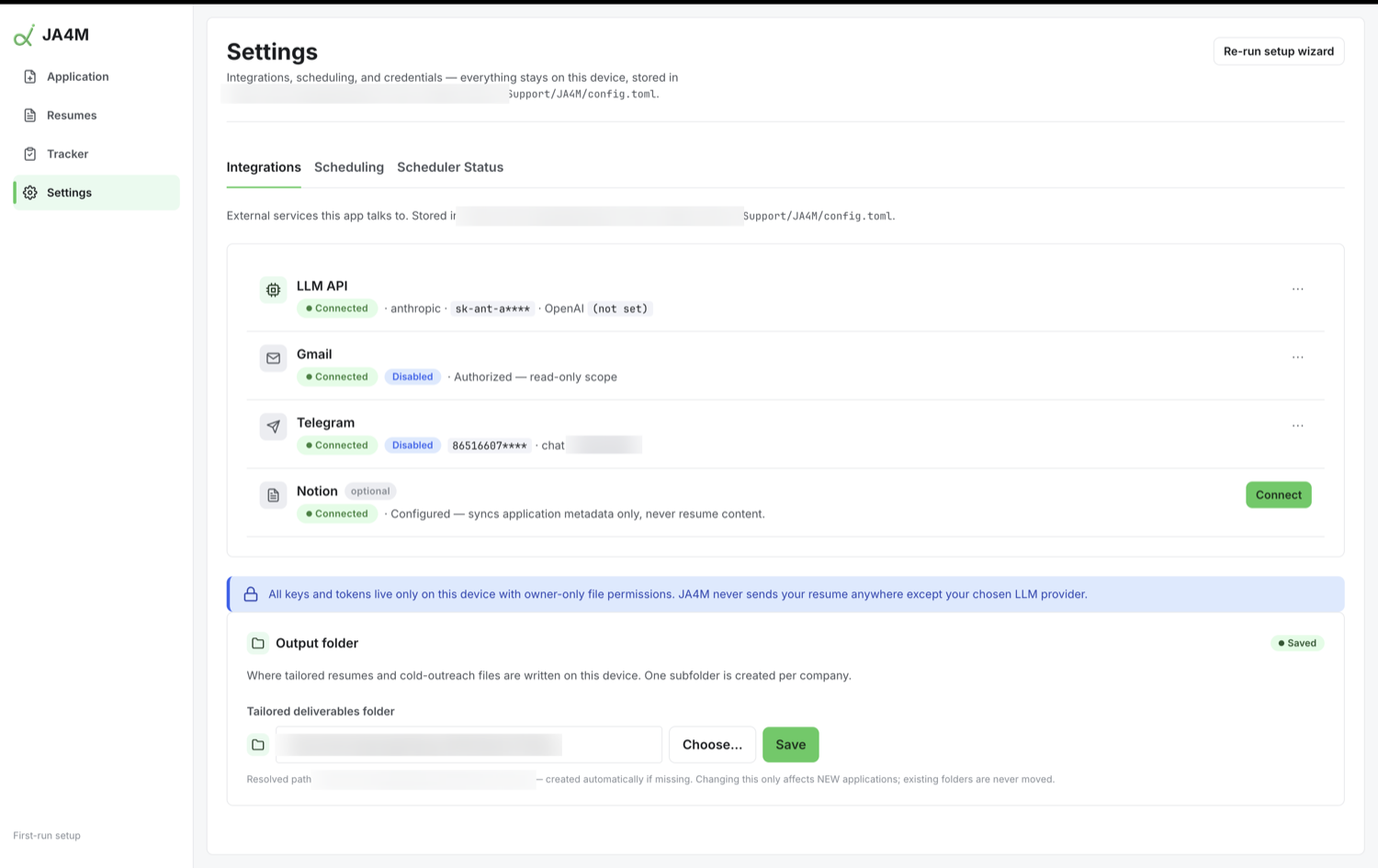
Inbox & digest

Optional read-only Gmail polling updates statuses, and a daily Telegram digest sums up the day.

Get it

Download JA4M

A desktop app for macOS and Windows. Linux runs from source. It’s free; you supply your own Anthropic API key.

macOS

JA4M-0.1.0-arm64.dmg
Download for macOS
First launch: right-click the app → Open, or System Settings → Privacy & Security → Open Anyway. The app is unsigned, so macOS asks once.

Windows

JA4M Setup 0.1.0.exe
Download for Windows
First launch: SmartScreen shows a warning, so click More infoRun anyway. The app is unsigned, so Windows asks once.
An Anthropic API key Your resume as a .docx Gmail, Telegram, and Notion are optional and off until you turn them on.

Questions

Good things to ask before you install.

Is my data safe?
Yes. JA4M runs entirely on your laptop. Your resume, your Gmail data, and your application history stay in a folder on your machine. There is no account, no cloud database, and no telemetry. The only thing that leaves your computer is the request to your own AI provider to reword bullet text.
Why do I need my own API key?
So there is no middleman and no subscription. You bring your own Anthropic key, and the AI cost, roughly five cents per application, is billed to you directly at cost. It also means your resume is only ever sent to the provider you chose, not to a service in between.
Why does my computer warn me when I open it?
The installers are not code-signed yet, so macOS and Windows show a one-time “unidentified developer” warning. It is a formality about the signature, not the app. On macOS, right-click and choose Open; on Windows, click More info then Run anyway. Signing is on the roadmap to remove the warning entirely.
Does it auto-apply to jobs for me?
No, deliberately. JA4M writes the tailored resume and the outreach, but you read and send everything yourself. It never emails a recruiter, submits an application, or acts on LinkedIn on your behalf. You stay in control of every submission.
Will it change how my resume looks?
No. It edits your .docx in place rather than rebuilding it, so your fonts, spacing, and one-page layout are preserved exactly. It only rewords bullet text, and it can never touch your name, dates, section titles, or contact details.
What does it cost?
The app is free and open source under the MIT license. You only pay your AI provider for what you use, which comes out to roughly five cents per application. No subscription, ever.

Ready when you are

Spend five minutes per application, not thirty.

Keep your resume, your data, and your voice on your own machine.